
allfamiSign in

All the family, all in one place.

Everyone caring for the same person, finally on the same page.

Medications, tasks, appointments and daily notes in one place - whether you're running a child's week between two parents or keeping an ageing parent's care straight from two hundred miles away. And if somebody is paid to help, their shifts, their hours and their pay are here too.

Set up a family in a couple of minutes. Invite people when you're ready.

See it first: take the quick tour
  • Free for family care
  • Installs on any phone - no app store
  • Works without a signal
  • English · Ελληνικά · Polski

Care is a group effort held together by memory

A parent gives the morning dose, a sibling takes the afternoon appointment, a carer comes on Tuesdays. What actually happened lives in three phones, a kitchen whiteboard and somebody's head - until the day somebody asks whether the tablets were given, and nobody is certain.

What's in it

Twelve things, built for a household rather than an office. Each one is a full screen in the app, not a checkbox on a list.

Medications

The part that has to be right.

  • Schedules that repeat daily, on chosen weekdays, or monthly - with a start and end date, so a two-week course stops on its own.
  • Each day's doses in order, with Give, Skip and Refused, and a confirmation naming the medicine, the person and the outcome before anything is written.
  • Every record says who gave it and at what time, so the next person knows without asking.
  • As-needed medicines with guards: a minimum gap between doses and a daily maximum, refused with the reason rather than silently allowed.
  • Critical medicines are marked, and a dose that goes unrecorded past its time is chased - the family first, and next of kin only if nobody nearer has acted.
  • Stock counts and refill reminders, so the box is never empty on a Sunday.
  • An adherence report over any range, printable, in a form a clinician can read.
  • What each medicine is for, written beside it, so somebody new knows why it's taken.
  • A chart of everybody's doses over any period, that goes from the whole family down to one person and one medicine.
Tasks and routines

The rest of the day, split between people.

  • One-off jobs or standing ones - every Monday and Thursday, the first of the month, every other week.
  • A time or a time range: "swimming, three till four" is a slot on the day, not just a deadline.
  • Categories your family names and colours itself, so a glance tells you what kind of thing it is.
  • Assign a task, or leave it for whoever gets to it - anyone can take it on with one tap.
  • Mark it started, so two people don't both begin the school run.
  • Save a routine - the six things every morning - and put the whole lot on the day with one tap. Tapping twice adds nothing, and says so.
  • Call one off with the reason, kept with the task rather than lost in a message.
  • Reminders before it's due, to whoever it belongs to.

Appointments

Turning up prepared, and coming home with answers.

  • Who is going, who is taking them, where, and the clinic's number one tap from the row.
  • Questions to ask, written down by anyone in the family beforehand - and the answers recorded in the room.
  • Things to remember: the blue folder, the fasting, the referral letter.
  • Notes from the visit and a follow-up date, so the next one is already in the diary.
  • A month at the top of every screen, with a dot on each day that has something on it and the appointment days shaded - tap a day and the whole app moves to it.
  • Ask the family's chat who can take them: one tap shares it to WhatsApp, Viber or a text - who, when and a link, and nothing private.

The care log

What actually happened, day to day.

  • Entries for meals, sleep, mood, incidents - whatever the day held.
  • Speak a note instead of typing it. The words are recognised on the phone itself; this app uploads no recording.
  • Vital signs with the normal range, so a reading outside it is flagged as it's written.
  • A body map: mark a bruise, a sore or a rash on a named part of the body, and add to it week by week instead of writing over it - so "fading" has last week underneath it.
  • Flag anything the family needs to look at; it stays at the top until somebody acknowledges it.
  • An incident report that is filed rather than edited: what happened, who was told, what was done - kept as it was written.
  • Notes kept between family members, hidden from hired carers, for the things that aren't theirs to read.
  • The charts a nurse asks for: fluids against the day's aim, bowels on the Bristol scale, turning, pain from 0 to 10, and behaviour - what came before, what happened, what came after. A reminder when the fluids fall short or a turn is late, and a month printed for the nurse.

Shifts and hours

For families who pay somebody, and families who don't.

  • Book who's coming and when, or set a standing arrangement - every Monday and Friday, nine till three - and let it book itself a month ahead.
  • Book a shift with nobody on it yet, so a Saturday-shaped hole sits on a screen instead of in somebody's head - and see who could take it, whoever's free first and then whoever's week is least full.
  • Carers clock in and out on their phone; breaks come off the total.
  • Nobody clocked in? A quiet word to the carer at fifteen minutes, and the family told at thirty.
  • The handover writes itself at clock-out - doses given, tasks done, what the log says - and goes to whoever is next.
  • Carers get their own first screen: on the clock or not, when they're next expected, what's left to do, and the number to ring.
  • When somebody leaves, hand their upcoming shifts to their replacement - the work they already did stays theirs.
  • A personal assistant paid by a state programme: the Greek weekly hours with their two deadlines, and the Polish monthly card. Free - the household is not the one paying.

Pay, expenses and time off

The employment half, which coordination apps don't do at all.

  • Hours, rates and pay worked out for you, with a timesheet you can download and a payslip per person.
  • Approve hours, or query them with a note; nothing is paid until it's agreed, and what's still owed is a running figure rather than a guess.
  • Expenses with a photo of the receipt, agreed or queried the same way the hours are.
  • Mileage by distance rather than by amount - the app prices the trip at your family's rate, so nobody has to work it out.
  • Paid travel time counted, and kept apart from the shift itself, so the care record never says somebody was at the house when they were driving.
  • Pay is a dated record, not one figure: raise it from the first of the month, backdate it if that's what was agreed, and still see what somebody was on last March - next to the arrangement itself: agreed hours a week, notice period, the day they started.
  • Holiday earned from the hours actually worked - a set number of days a year, or a percentage when the week varies - shown with the sums rather than as a number to trust.
  • Time off asked for, agreed or refused with a reason, and cancelled rather than deleted. Sick days counted separately and never taken out of the holiday.

People, records and emergencies

The things you need when it matters and can't go looking.

  • A profile per person: allergies with their severity and treatment, conditions, emergency contacts, doctors and clinics.
  • An emergency card as a code for the fridge door or a wallet - allergies, conditions, current medication, who to call - readable by an ambulance crew with no account, no app and no password.
  • A hospital pack to print: who this person is, and what has actually been happening - the doses that were missed, and a count of the rest.
  • A document vault for prescriptions, care plans and insurance, with reminders before anything expires.
  • Everyone marked with their own colour, so a mixed list is readable at a glance.
  • A map of who is who to whom: the family, the carers, and the person at the middle of it all.

Getting people in, and information out

The parts that reach people who will never install anything.

  • Invite by email, or hand somebody a link or a code across the kitchen table and have them in the family in a minute.
  • A read-only calendar feed of the shifts and the appointments, subscribed to once in any phone calendar. Move a shift on Tuesday and it moves in theirs, with nobody told to go and look.
  • Timesheets, expenses and reports as spreadsheets - with the dates, numbers and money in the format each person chose, in the emails too.
  • Export everything the app holds about you, or the household's whole record with its activity trail. Both are a button, not an email address and a two-week wait.
  • Close an account, or delete a family, for good - with the password and the word typed out, and what happens said plainly first.

Somebody who lives alone

A quiet day should never go unnoticed.

  • "I'm OK today": one tap a day from the person themselves, by a time you choose.
  • If nobody taps, they are asked first, then the family is told - and, if you chose it, their first contact gets an email.
  • Paused while they are away or in hospital, so a quiet day that was planned alarms nobody.
  • A screen at home: an old tablet in the kitchen showing their own day in big letters - the time, the next medicine, who is coming.
  • Set up with six digits, like a television, and nobody is signed in on it. It can say "I'm OK" and, only if the family allows it, mark a regular medicine taken.

Shared costs

What the family has paid for, and who owes whom.

  • Who paid for what - the tablets, the taxi, the carer - split by the shares the family agreed.
  • Each cost keeps the split it was made with, so changing the shares never rewrites what somebody owed before.
  • Who should pay whom, in the fewest payments that even everybody up - and settling up, recorded.
  • A receipt with each cost, and the year's list for the tax return.
  • Free, like the rest of the care: this is relatives sharing, not employment.

Hospital, and time away

When the usual week stops.

  • Going into hospital skips the doses still waiting, with the reason, removes the ones to come and pauses the check-in.
  • Coming home, each medicine is gone through against the discharge letter - the same, changed or stopped - and the letter is kept with their documents.
  • The main carer taking time off: everything that is theirs in those days goes to whoever covers, and comes back if the plans change.
  • "Can't do today?" hands a single day to a backup chosen in advance.
  • A wallet card for the carer: who to call, with no address on it.

When care comes to an end

Handled gently, and without the app telling anybody.

  • Recording a death stops everything that would still ask for them - doses, tasks, visits, the rota, the check-in - and changes nothing already written.
  • No notification is sent. Nobody should learn of a death from an app; whoever records it knows who needs telling.
  • For anyone paid to care for them: a final pay that counts every agreed hour and the holiday never taken, and a reference to print.
  • The person's whole record, downloaded as one file to keep.
  • Recorded by mistake, it can be taken back.

See every screen before you sign up

A quick tour of the real app - the day, medicines, routines, appointments, the care log, shifts and shared costs - photographed with a made-up family, in your language.

Take the quick tour
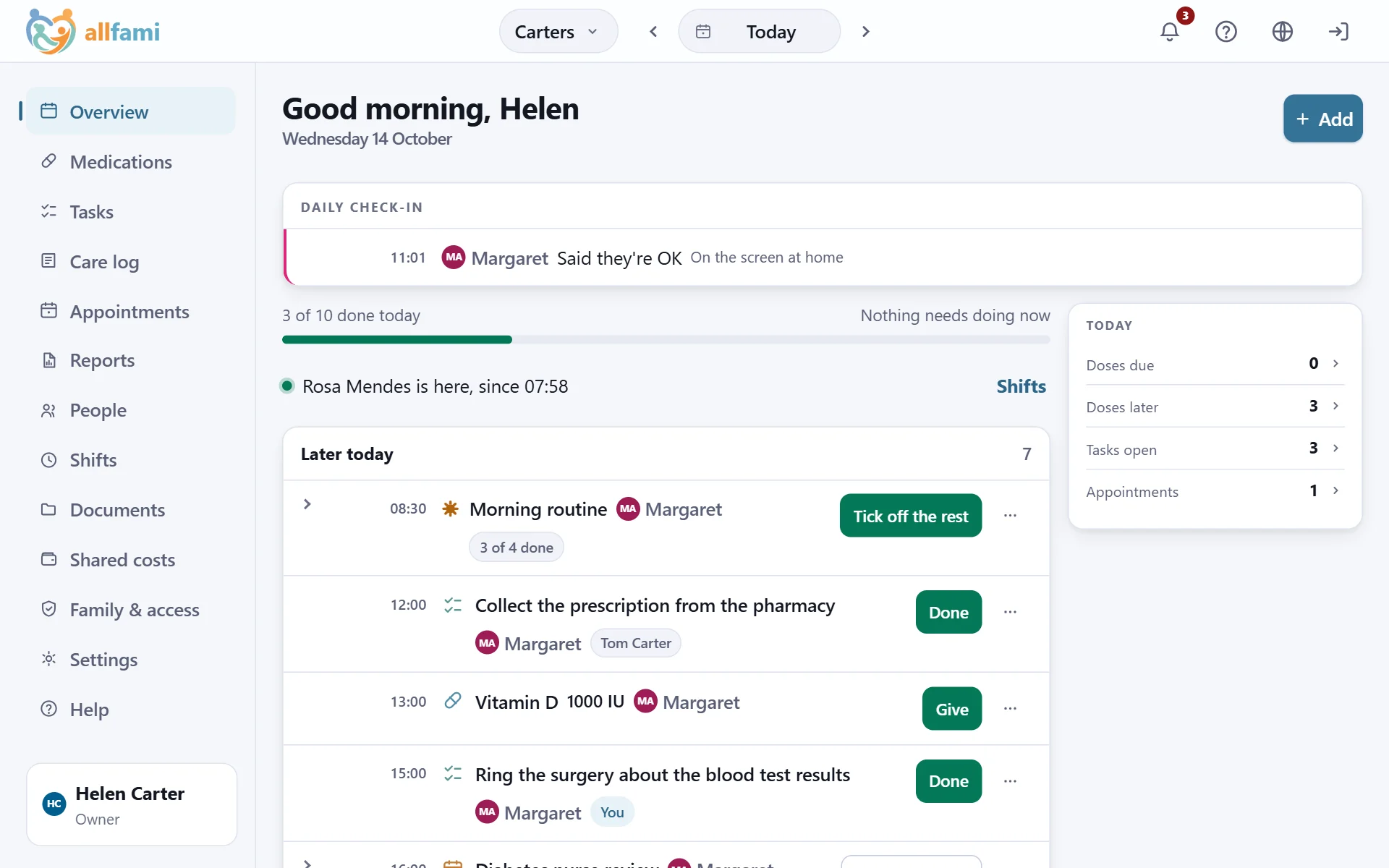
The Overview on a computer: the menu down the left; in the middle, Margaret's check-in, three of ten things done today, Rosa here since 07:58 and what is later today; on the right, the day's counts.

If somebody asks what happened, can you say?

A doctor asking how high the fever got. A sibling asking whether the tablets were given on Tuesday. A question about whether a carer did the right thing. allfami keeps the answer.

  • Every dose, with who gave it and at what time - and if it was ever corrected, what it said before.
  • Incident reports that can't be quietly rewritten the next morning, with follow-ups stamped and kept.
  • A body map, so "was that there last week?" has a record instead of a memory.
  • A handover written from what actually happened during the shift, not from recollection.
  • An audit trail of who changed what, readable by anyone in the family who is allowed to see it.
  • A hospital pack you can print on the way out of the door.
  • Charts a nurse can work from - fluids, bowels, turning and pain - printed a month at a time, with each day's fluids added up.

This is what agency software charges hundreds a month for, and what no free coordination app has. Stop paying and none of it is taken away.

Who it's for

For parents

A child's inhaler, the antibiotics that finish on Friday, swimming at four, the paediatrician on Tuesday - organised once and visible to both parents. Add a grandparent or a babysitter and they see exactly the part that's theirs.

For families

Log every dose and see who gave it. Split the school run and the pharmacy trip. Never lose the question you meant to ask the doctor.

For adult children

Keep a parent's medications, appointments and vitals straight from anywhere - and bring a proper record to their next appointment.

For caregivers

Arrive to a job that's already organised. One account for every family you work with, your own first screen, your hours tracked, your holiday counted, your handover written for you.

On your phone, without an app store

allfami is a web app that installs. Open it once, add it to your home screen, and from then on it opens like any other app - no download, no store account, and it updates itself.

Add it to your home screen

Your browser offers to install it, or you add it from the share menu. It gets its own icon, opens full screen without the address bar, and takes up almost no space.

Reminders where you'll see them

A dose due, a task nobody has picked up, a carer who hasn't arrived - the phone notifies you like any other app would, once you allow it.

The same on every device

iPhone, Android, laptop - it's one app and one account. Sign in on your mother's tablet and it's already set up, because there was nothing to install in the first place.

Built for something that matters

Everyone sees only their part

A hired carer sees the person they care for and nothing else. Permissions are set per member, and can be narrowed to particular people in the household.

Who can see what, on one screen

One page per person: everybody in the family, what each of them can read, what each of them can change, and the reason you're allowed to hold any of it. Including the people who can see nothing - because that's usually the answer you came for.

Nothing is quietly rewritten

There's an activity trail of who did what, read-only. A finished task or a recorded dose is a record - undoing one is the family owner's to do, not anybody's.

Proof, not surveillance

A family can ask that clocking in be checked against the address. The carer's phone asks them every time, the answer is kept - at the address, or not - and where anybody has been is never written down.

It works where care happens

Built for a phone in a hallway on a bad connection. Installs to the home screen, and reads properly at any text size.

In your language

English, Greek and Polish throughout - including the dates, the plurals and the money.

What it costs

The care is free. The employment is paid - one price for the household, whether that's one carer or four.

allfami

Free

Everything about the care. For good.

  • Everybody in the household, and everybody you invite - no limit, and no charge per person.
  • Medications, tasks, appointments, the care log, vitals, the body map and incident reports.
  • People and their records, documents, the emergency card and the hospital pack.
  • Shifts, clocking in and out, hours counted, and the handover written at the end of each one.
  • The calendar feed, and your data out again whenever you want it.
  • Shared costs between relatives, the daily check-in, a screen at home, the charts a nurse asks for and a state programme's paperwork.

allfami Household

€19 a month

or €190 a year (saves €38)

For a household that pays somebody.

  • Everything above, plus the half that only exists because money changes hands.
  • Rates, rate history, and the arrangement in writing: agreed hours, notice, start date.
  • Timesheets, a payslip per person, and a running figure for what is still owed.
  • Expenses with the receipt, and mileage priced by distance at your family's rate.
  • Holiday earned from the hours actually worked, and time off asked for and agreed.
  • When a job ends, a final pay that counts the holiday never taken.
  • One price for the household - however many carers, however many people you care for.
  • Never per person cared for. A household looking after a parent and a child pays what a household looking after either one pays.
  • Never per carer. Inviting the person who does the work is the thing that makes the record worth having; charging for it would be charging you to keep it accurate.
  • Stop paying and nothing is taken away. Every timesheet, payslip, expense and figure you have recorded stays readable, printable and exportable - permanently. What stops is adding new ones.
  • No adverts, and nothing about your family is sold or shared with anybody. This is health data about people who did not choose to be in a database.

VAT included — that is what leaves your account.

The paid half is free for your first month, with no card. You can stop whenever you like, from inside the app.

Start with one person and one medicine

You don't have to set the whole thing up. Add the person you're caring for, put in one medication, and see how the day reads. Everything else can wait until you need it.

Free to try. You can invite the rest of the family whenever you're ready.